
The first thing you will see after you clicked the Edit Your Member Page(s) link box on the My Account page is what is shown in Figure 8.
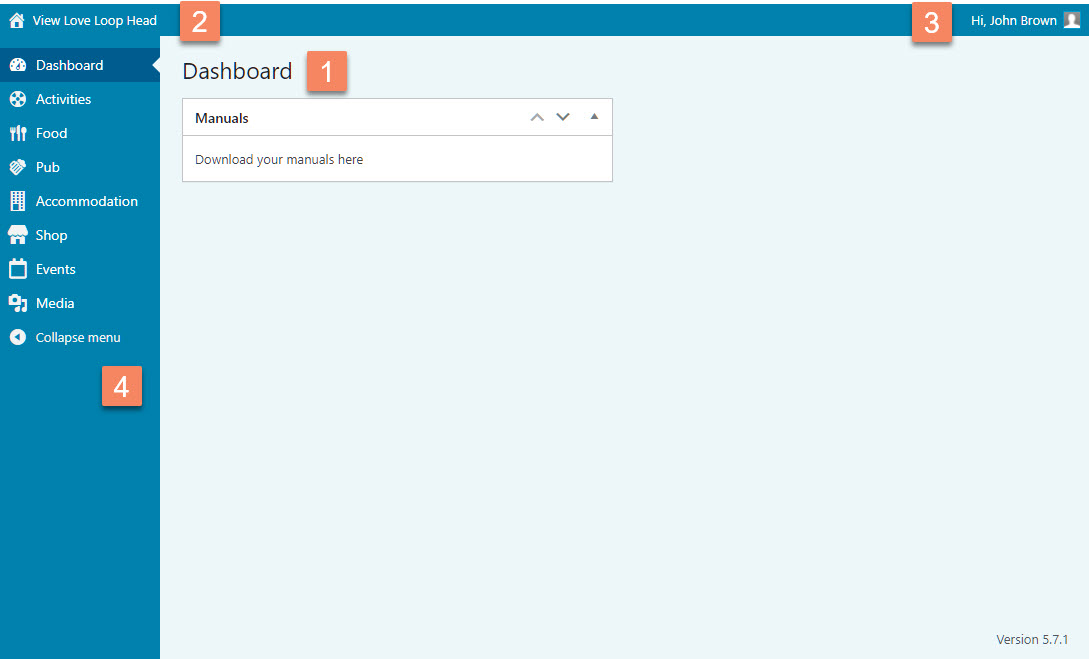
Figure 8
This is what is called the WordPress Admin Area. The first thing you’ll see is the Dashboard (Figure 8.1). On the dashboard you will see important notifications, tips and/or links to other resources. This information will be expanded on in the future.
A few other important parts of the WordPress admin area are:
Figure 8.2: View Love Loop Head
Clicking on this link will open the front-end of the website in a new tab. This can be handy when you’re editing your member page. You can edit the page in one browser tab and switch to the other tab to see how it all looks.
Figure 8.3: Hi…
From here you can also change your profile. It also gives you the option to log out, but doing so also logs you out from any other open browser tabs. Best practice is not to use this option but simply closing the browser tab, so you will return to the My Account page on the front-end of the website.
Figure 8.4: The Main Admin Menu
Here you can access the main sections of the website. You will see a list of the Member Categories, Activities (Do), Food (Eat), Pub, Accommodation (Stay), Shop and Events. The Media menu shows you all uploaded images and other media.